
Quick quiz:
-
Your computer has been infected with a virus, and it deleted everything on the server. What would you do?
-
Send the server hard drive to a data forensic/analysis firm to see if they can recover your project data.
-
Recreate all your marketing material from scratch, scanning your logo and everything else.
-
File a law suit against Microsoft, Symantec, and Dell for letting this happen.
-
Call your friendly computer technician who disinfects your computers and then restores your previously backed up data from the Internet.
-
-
Your office is broken into, and your server has been stolen. What would you do?
-
Wrack your brain to remember all the details of each client project, write down everything on a legal pad, and use the phone book to find all your customer's phone numbers to let them know you can't deliver.
-
Go for a walk on the Aurora bridge, and find yourself staring down at the ship canal trying to decide whether to jump.
-
Close the business and go get a day job.
-
Calmly purchase a new computer on credit and restore your backups from their safe location out on the Internet, or the backup hard drive in your safe, and be back up and running with at most a few hours of disruption.
-
-
You come back from the bathroom to find your laptop gone, and the doors of the coffee shop still swinging from the thief's quick exit. What's next?
-
You go to the business bank account, cash out all your existing cash, and buy a ticket to South America to avoid all those lawsuits from the sensitive customer data that just fell into malicious hands.
-
You pull the old laptop out of the office closet, and restore the non-sensitive files you were working on through the simple Backuppc web interface, and immediately get back to work on that important project, only losing that day's work. All the sensitive stuff on your laptop is safely encrypted on its hard drive, and you don't store personally identifiable information anyway, so it's not that big a deal.
-
You blow the dust off the 1998 workstation, plug it into the network connection in the wall, and boot into the same desktop view you were just working with on your laptop, before it walked out the door. Since the data never left your server, there's no business data on the laptop at all—you were working through a remote desktop, and you haven't lost even a keystroke of data. You're surprised to find the ancient desktop running just as fast as your 2-month old laptop.
-
-
The hard drive on your desktop dies. You:
-
Are screwed.
-
Put a new one in, and the RAID array automatically starts restoring data to the new drive.
-
Put a new one in, reinstall the operating system, and restore your data through the BackupPC web interface.
-
Put a new one in, reinstall the operating system, and drag your active files back over to the desktop from the network backup location.
-
When it comes to backing up computers, there are two types of people: those who have lost data, and those who will. Hard drive failure or accidental deletion are probably the most common reasons people lose data, but when you start to think about the risks to your data, those are among the easiest things to prevent.
For many people, the data on a computer is not very important. If you use an online email service such as Gmail or Yahoo, post your best photos to an online photo service such as Flickr, keep your important addresses in a paper-based address book, and manage your checkbook through your bank's web site, your computer may not have anything on it that needs backing up. On the other hand, if you use your computer to draw building plans for client projects, or manage employee censuses, or keep patient records, losing that data could put you out of business.
So how should you back up your data? It depends. How much data do you have to back up? How badly would losing the data impact your business? How much damage could you sustain if your data fell into the wrong hands? What risks do you face? There is no single backup method that is the answer for everyone.
That said, today it's easier than ever to find a great backup solution to meet your needs, and there's really no excuse for not having a solid backup system. Because most of us face a variety of risks, it's worth implementing more than one backup solution—a backup system that helps you recover from an office fire may not help you restore files corrupted by a virus that you didn't discover were infected until a month after the fact.
If you'd like help sorting out these issues, give us a call or drop us an email—we'd be glad to help. Meanwhile, let's talk about a great backup solution for small offices.
Free Software of the month: Backuppc
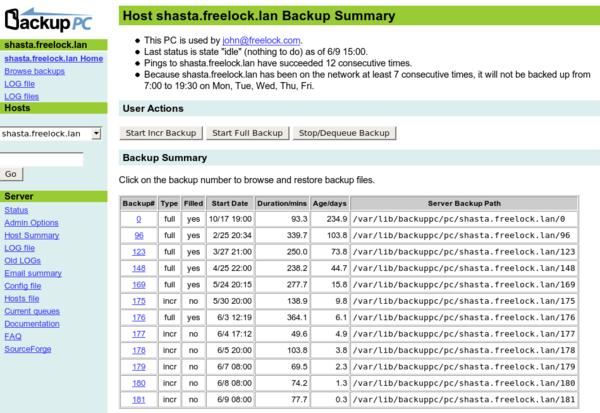
At Freelock, we currently have three separate backup systems for backing up our data. But we usually only restore from one: Backuppc. Backuppc runs on a dedicated server in our office, a circa 1995 server loaded down with large disks. It goes out to all of our other servers and several of our laptops on a daily basis and copies down everything that has changed. Once a week, it copies down everything we've specified.
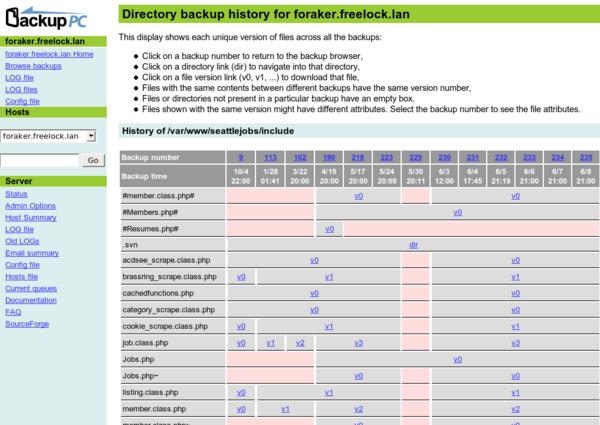
What's more, Backuppc is miserly with its disk space. It compares each new file with the rest of the backup set, and if it finds an exact copy already there, it just adds a pointer to it. This verification happens with each weekly full backup, so even if the backup copy gets corrupted somehow, within a week you have a good copy again. It also compresses each file. The net effect is that we have more than 600 GB of data backed up on about 100GB of disk space.
Backuppc automatically waits until after hours to back up computers that are permanently connected. Laptops that come and go get backed up whenever they appear on the network. Computers that do not get successfully backed up for a week trigger an email to the owner, and the machine owner can log into the web recovery site at any time to restore their own backups or manually start a backup.
Drawbacks
Backuppc needs to run on a computer that is on all the time to best do its job. I also think the way it sucks backups down from workstations is backwards—workstations should push their data to servers, because with this approach the workstation must act as a server and expose some service that Backuppc can access. This can complicate keeping laptops that roam to other networks both secure and backed up.
Because Backuppc generally needs to be run on a local area network (LAN), it does not protect against physical threats such as theft, fire, hardware failure, etc. Backuppc is a great primary backup system, but I recommend having other backup systems available to mitigate these other risks.
The other main limitation of Backuppc is that you can really only have one active backup disk, and when you exceed the capacity of that disk, upgrading can be painful and risky. Technologies like RAID and LVM make it possible to build a flexible underlying disk system that acts like a single disk, so with proper planning this isn't a huge issue, but it does mean there's a maximum size to the backup set—this is more appropriate for a small business or medium business that does not have huge data storage needs, not an enterprise.
Best Uses
Backuppc is perfect for a small office, with anywhere from 3 to 30 workstations and several servers, where people are not in the habit of storing everything on a central server. You'll find that you use it far more than you would expect to use a backup system, and aside from adding or removing computers, and monitoring its disk space, it pretty much runs itself with no babysitting required.
Freelock News
If you're thinking you haven't heard from us in a while, that's because we've been heads down building the business. Freelock has made some gigantic strides in the 6 months since our last episode. We've written a completely new business plan, setting up the company to eventually become an employee-owned venture. Chris Longmoon, who previously ran a web design firm called Lunaworks for 8 years, joined the team in February and became our third regular employee in April. Jason Kuchynka, a junior developer, became our fourth employee just this week and we have a new system administrator scheduled to start on June 18.
I expect we'll be at 5 employees for a few months, but we continue to use the services of several different contractors to help get projects out the door.
On a more personal note, I've taken up a new sport: Knee scooter cross-country.

It's a sport limited to a select few who get a doctor's prescription for the scooter—I joined the exclusive club by tearing my Achilles tendon the week before Memorial day, and getting it surgically reattached a few days later. If you'd like to be a spectator, come to our house on the side of Queen Anne Hill and I'll demonstrate my backwards hill-descending technique and the Barney Rubble skid-stop.
About Freelock Computing
We're the go-to company in Seattle for open source business solutions. We provide three core services: Technology consulting with an open source approach; Linux and open source administration; and custom software development of LAMP applications.
We love to help businesses discover great free software, and help them make computers work for them in their business. If you know any businesses that need help with technology, send them our way!












I don't actually back up my work ever but thanks for all of the great tips. I never knew there was so much to it....