
Remind customers of abandoned carts

Sometimes a simple reminder can spur a sale. If you have repeat customers that log into your commerce site, you may be able to remind them if they did not complete a checkout.

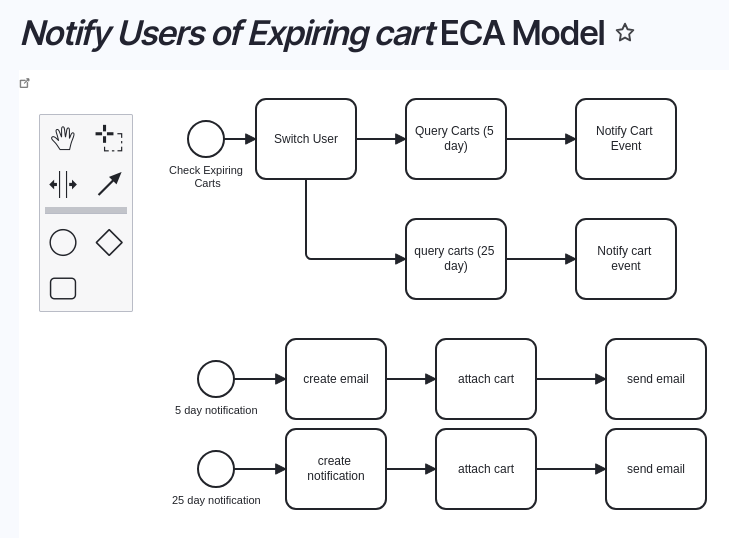
One of our customers is a manufacturer/distributor, who requires customers to log in to shop their site. Drupal Commerce can automatically delete abandoned carts after a certain number of days. Using the Events, Conditions, and Actions (ECA) module, some views, and the Easy Email module, we set up some custom emails that send to users who started but did not complete an order after 5 days, and again after 25 days, before clearing them out.
Advent 2024 - 24 days of automation

Door number 7
7
Door number 10
10
Door number 14
14
Door number 19
19
Door number 6
6
Door number 17
17
Door number 1
1
Door number 4
4
Door number 16
16
Door number 22
22
Door number 3
3
Door number 21
21
Door number 5
5
Door number 2
2
Door number 11
11
Door number 9
9
Door number 15
15
Door number 12
12
Door number 8
8
Door number 13
13
Door number 18
18
Door number 20
20
Door number 23
23
Door number 24
24

Jo Jo (not verified)

December 10, 2024

Great solution but how do you create/manage the 2 and 25 day reminders?

We use a view with a date filter set to the relative offset -- e.g. "-2 days". And the Easy Email module has a "key" field you can set to prevent it from generating/sending a message more than once.

Add new comment

The content of this field is kept private and will not be shown publicly.

Filtered HTML

  • Web page addresses and email addresses turn into links automatically.
  • Allowed HTML tags: <a href hreflang> <em> <strong> <blockquote cite> <cite> <code> <ul type> <ol start type> <li> <dl> <dt> <dd> <h1> <h2 id> <h3 id> <h4 id> <h5 id> <p> <br> <img src alt height width>
  • Lines and paragraphs break automatically.

Drupal Canvas — Block HTML (locked)

  • Allowed HTML tags: <strong> <em> <u> <a href> <p> <br> <ul> <ol> <li>

Drupal Canvas — Inline HTML (locked)

  • Allowed HTML tags: <strong> <em> <u> <a href>