
Automatically set fields on content

One of the easiest things to do with the Events, Conditions, and Actions (ECA) module is to set values on fields. You can populate forms with names and addresses from a user's profile. You can set date values to offsets from the current time. You can perform calculations and store the result in a summary field, which can make using them in views much more straightforward.

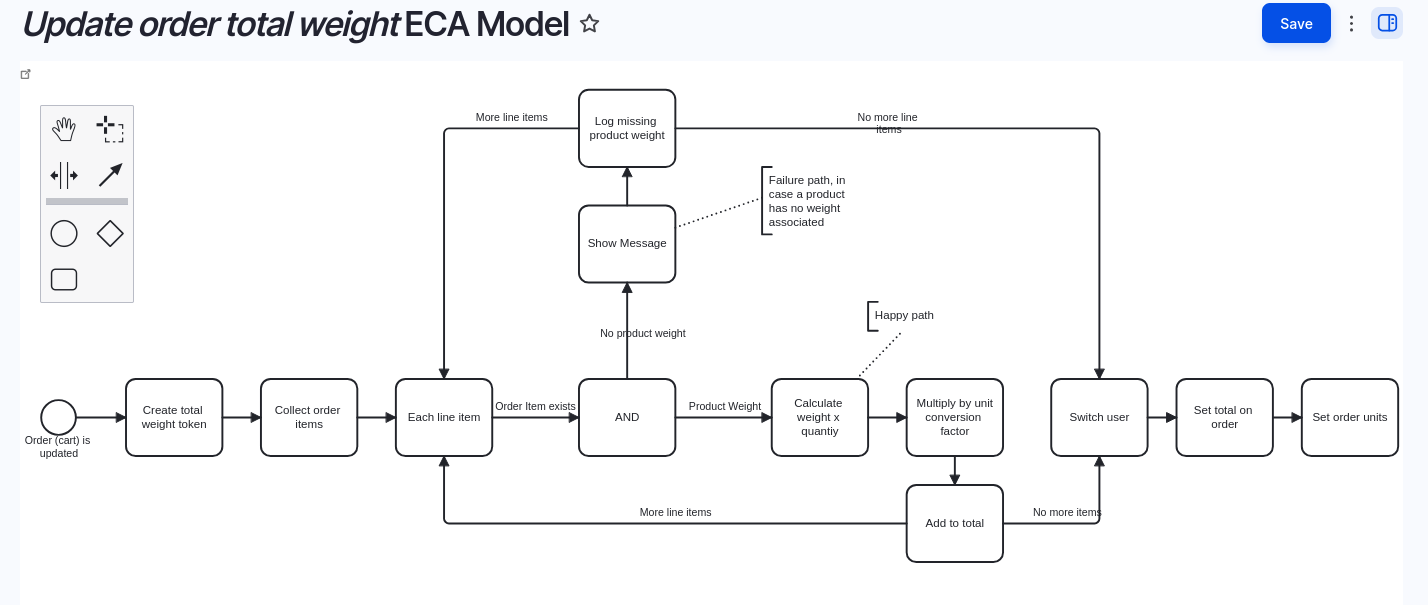
One of our clients wanted a total weight calculated per order. Commerce Shipping does provide this, calculating weights of packages -- but it doesn't provide an easy way to do this for the entire order.

We were able to add a custom weight field on the order, and calculate the total, taking units into account, using ECA.
Advent 2024 - 24 days of automation

Door number 7
7
Door number 10
10
Door number 14
14
Door number 19
19
Door number 6
6
Door number 17
17
Door number 1
1
Door number 4
4
Door number 16
16
Door number 22
22
Door number 3
3
Door number 21
21
Door number 5
5
Door number 2
2
Door number 11
11
Door number 9
9
Door number 15
15
Door number 12
12
Door number 8
8
Door number 13
13
Door number 18
18
Door number 20
20
Door number 23
23
Door number 24
24

Add new comment

The content of this field is kept private and will not be shown publicly.

Filtered HTML

  • Web page addresses and email addresses turn into links automatically.
  • Allowed HTML tags: <a href hreflang> <em> <strong> <blockquote cite> <cite> <code> <ul type> <ol start type> <li> <dl> <dt> <dd> <h1> <h2 id> <h3 id> <h4 id> <h5 id> <p> <br> <img src alt height width>
  • Lines and paragraphs break automatically.

Drupal Canvas — Block HTML (locked)

  • Allowed HTML tags: <strong> <em> <u> <a href> <p> <br> <ul> <ol> <li>

Drupal Canvas — Inline HTML (locked)

  • Allowed HTML tags: <strong> <em> <u> <a href>