
Show a mix of future and past events

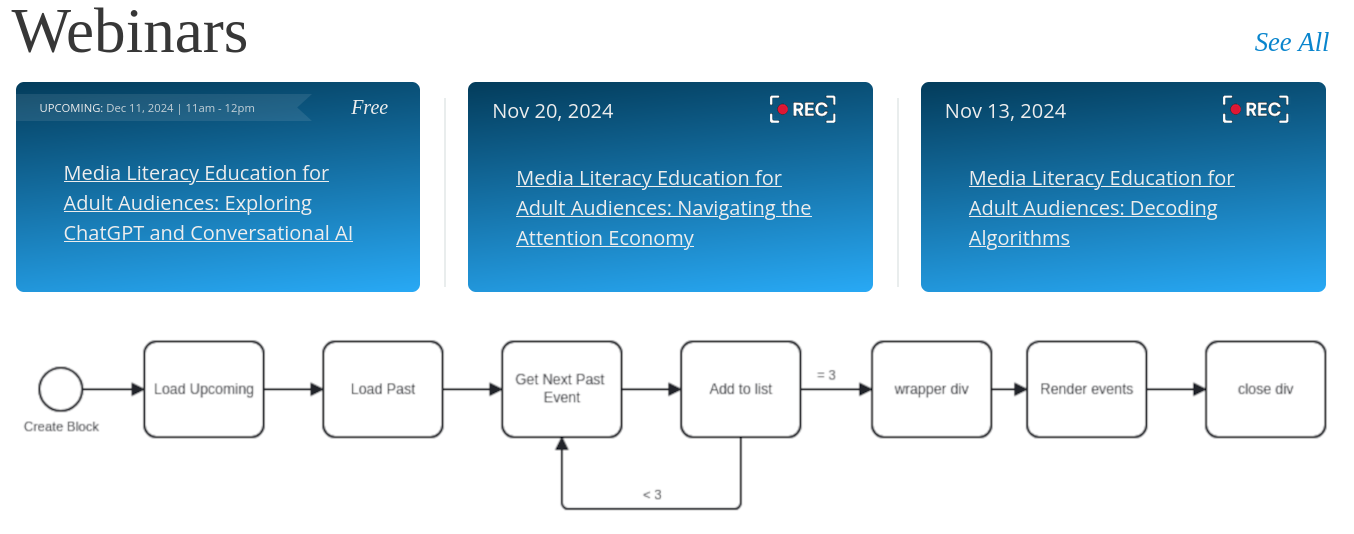
Another automation we did for Programming Librarian, a site for librarians to plan educational programs, involved events. They wanted to always feature 3 events on the home page, and the most important events were in the future. If their schedule is full, they wanted 2 future and 1 past event visible -- but they don't always have upcoming events, so there might be 0, 1 or 2 future events, and 3, 2, or 1 past events.

We solved this conundrum using the Events, Conditions, and Actions (ECA) module with two views -- one for the next 0 - 2 events in the future, and one for the most recent events in the past. With ECA, we could then draw from these views one event at a time to fill up our row of 3.
Advent 2024 - 24 days of automation

Door number 7
7
Door number 10
10
Door number 14
14
Door number 19
19
Door number 6
6
Door number 17
17
Door number 1
1
Door number 4
4
Door number 16
16
Door number 22
22
Door number 3
3
Door number 21
21
Door number 5
5
Door number 2
2
Door number 11
11
Door number 9
9
Door number 15
15
Door number 12
12
Door number 8
8
Door number 13
13
Door number 18
18
Door number 20
20
Door number 23
23
Door number 24
24

Add new comment

The content of this field is kept private and will not be shown publicly.

Filtered HTML

  • Web page addresses and email addresses turn into links automatically.
  • Allowed HTML tags: <a href hreflang> <em> <strong> <blockquote cite> <cite> <code> <ul type> <ol start type> <li> <dl> <dt> <dd> <h1> <h2 id> <h3 id> <h4 id> <h5 id> <p> <br> <img src alt height width>
  • Lines and paragraphs break automatically.

Drupal Canvas — Block HTML (locked)

  • Allowed HTML tags: <strong> <em> <u> <a href> <p> <br> <ul> <ol> <li>

Drupal Canvas — Inline HTML (locked)

  • Allowed HTML tags: <strong> <em> <u> <a href>