
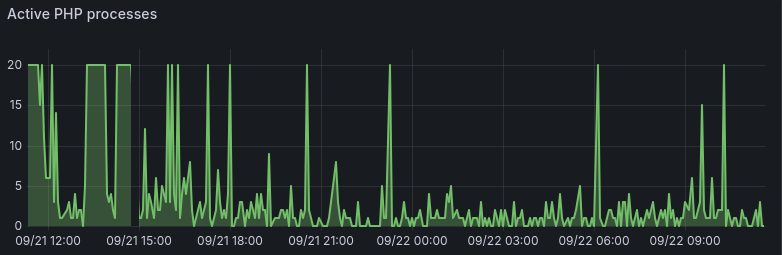

One of our client sites has been under constant attack for months, at a rate of 10 to 100 requests per second much of the time. When it was running Drupal 7, it was largely search pages that caused trouble, but after moving to WordPress we had to do a ton of work just to make the site handle traffic at all. And that was just the start -- over the next few months we deployed a series of changes to make their moderately beefy server capable of handling the attacks, and the load.
But after all that work, we were still getting multiple outages per week.
We're not alone here - Cloudflare offers controls to block high bot traffic. Drupal.org uses Fastly's bot protection system in an extremely annoying way -- it pops up for me regularly, and blocks access to my coding agents trying to look up information. Ask any web developer or agency tasked with keeping sites online and you'll hear stories.
We came out the other side with a stack of layers. Each one handles a different kind of traffic, a different problem:
- Full-page caching in Nginx. Tracking parameters and other query-string variations all share one cached copy instead of each creating a new one.
- Verified-bot rate limiting. We separate real search and AI crawlers from the bots impersonating them.
- Cache warming before newsletter sends, so the pages people are about to click are already in the cache.
- A tuned object cache. Bot junk no longer pushes out the data WordPress needs to build pages.
- Instant cache purges when editors update a page.
- An on-demand proof-of-work challenge (Anubis). It switches on only when the server is overwhelmed, and stays on longer each time the attack comes back.
None of this needed a load balancer, a cluster, or a CDN. Here's how we got there, and why we didn't just put it all behind Cloudflare.
Why not just use Cloudflare?
That's the question I expect from much of the audience here - doesn't Cloudflare solve this problem?
Maybe. It's certainly the default answer for many -- but I resist taking default answers just because everybody else does -- and I see Cloudflare as creating a new problem, a single point-of-failure for the Internet itself. I don't want to add to that problem -- and given the nature of the traffic, Cloudflare doesn't solve this problem without needing extra configuration and evaluation. To get what we built, you'd still have to:
- write cache rules
- bypass the cache for logged in users
- wire up purging when content changes
- normalize query strings
- tune bot rules and rate limits, with the finer-grained controls on paid plans
That's the same work, done in someone else's dahboard. And the attacks we see vary on every request, which bypasses Cloudflare's cache just as easily as ours.
Cloudflare's "Under Attack" mode is also something you turn on by hand. It has no idea your PHP workers are maxed out. To switch it on automatically you'd have to build the same observer we did.
Our first major mitigation was to improve caching -- the major gain we might get from Cloudflare. With Nginx's fastcgi_cache module, the site can actually handle tens of thousands of requests per second -- if the requests are going to pages in the cache. But with the attacks we see, every request is different, varied enough to bypass a cache. Including Cloudflare.
Rate-limiting good bots - verified
We've been applying rate-limits to various bots and crawlers for years. But much of our malicious traffic impersonates regular user browsers, or pretends to be another legitimate crawler.
The wholesale theft of the major AI companies stealing everyone's content is certainly not a settled issue as I write this -- but for most of our clients (and us) -- we want our content to appear when a user asks an LLM questions related to our expertise. Now that so many people use AI, often instead of coming to us directly, we at least want our views represented. So blocking AI crawlers at this point seems counter-productive. There are whole new professions extending what used to be "SEO" - now we have AEO or GEO, techniques for getting your content into or referred to by LLMs. Blocking them from your site means you're invisible to that traffic.
So we've added to our rate-limiting a layer that tracks the IP source addresses of a list of legitimate bots, and periodically refreshes that list. So now we differentiate between "good" bots that we can verify come from where they claim to come from, and "bad" bots that are impersonating other bots or users.
Cache Warming for Newsletter Traffic
This client typically sends two or three emails a week out to a list of over 40,000 members -- and when this mail hits inboxes, the site routinely gets over 10,000 visits within a minute or three. Drupal and WordPress both depend on PHP with workers that can handle only one request at a time, and each worker requires a chunk of dedicated RAM on the server -- which means you can typically run 20 - 40 workers on a typical web server before you've run out of RAM. That's a far cry from 10,000.
Nginx's fastcgi_cache can handle this, but we were hitting two significant issues:
- Many visits were going to new pages that were not yet cached - and this particular WordPress site is slow enough that it took 3 - 7 seconds to generate each page - during which there were hundreds or thousands of requests stacking up not getting a cached result.
- The back-end Redis cache, which we had deployed several months ago, was getting so much traffic from spam crawlers it was forcing the most necessary content out of the cache, leading to slower page build times.
The net result is, the organization would send out a newsletter, and the site immediately went down for 15 - 20 minutes until the highlighted pages were cached and the backlog of requests had "drained" - many of them having long given up waiting, or timed out. Every. Single. Time. (This used to be called the "Slashdot effect", back in the day...)
The typical agency answer? Let's add a CDN (again, Cloudflare). A load balancer. Throw more hardware at it.
That's not our answer, at least not until we've exhausted all other options. Adding a load balancer meant tripling their baseline hosting cost, and adding a significant ongoing maintenance burden.
Spicy take: Adding load balancing, multiple front end servers, Kubernetes clusters, and all the "conventional" ways of handling spiky traffic often makes your site slower and less reliable, at least until you 10x your running costs. More moving parts, shared-session and cache-coherence problems, more things to maintain - and fail. And for the vast majority of sites, entirely unnecessary.
To handle these issues, we set up a cache warming system, and changed the cache "eviction" policy.
We set up a dedicated cache warming mailbox for the client. When they send a message to this mailbox, a Python script picks it up, verifies that it came from them, builds a list of links in the message and sorts them into "cacheable" or "excluded" (e.g. links to other domains, login/my-account pages, etc), and then visits each cacheable link several times until it confirms a cache hit, and then sends them a reply with the result. We were already using a cache lock, but the page generation is slow enough on this site that we were still getting huge floods.
We also set up a systemd timer and script to automatically "warm" a list of common pages - the most important pages in the navigation - every 15 minutes.
For the WordPress Redis object cache, bot traffic was generating thousands of one-off query results that crowded out data the site needed repeatedly. We increased the cache’s capacity and switched its eviction policy from “least recently used” to “least frequently used,” (`allkeys-lfu`) favoring frequently reused entries over one-off queries. That helped preserve the object cache used to generate uncached pages, while Nginx’s separate full-page cache handled the bulk of anonymous traffic.
The result was... astonishing. The next email newsletter came out, and the server load barely budged. Nginx served over 13K page requests in the first 5 minutes, and the PHP worker pool never even got saturated!
Purging Cached WordPress Pages when Edited
We also configured a cache purge module in Nginx with a custom "must use" WordPress plugin, so that edits to these pages cleared the Nginx cache immediately. And we had already spent some time making sure things like analytics campaign tags and other query parameter variations didn't create new cache entries, that all of these variations shared the same cached items.
This is one area where Drupal's sophisticated cache invalidation has a clear lead -- our cache-purging for WordPress basically invalidates a list of common pages after each edit. Everything else in this post works just as well for Drupal as it does for WordPress.
Autoscaling to Anubis
But... our problems weren't yet over. We still had repeated waves of bot traffic that would make the site unavailable for periods of time. The Nginx cache kept the site available for casual traffic, but anybody logged into the site had to wait for minutes for each page load, frustrating for the site editors. It was time to look for the next step: a Proof of Work challenge. This is the heavy-handed screen you see more and more across the internet, testing if you're a bot or not. This is one of Cloudflare's solutions, and the annoying screen on Drupal.org.

There's an open source version of this called Anubis, which has been widely acclaimed as a good solution here. In several ways, it's better than the commercial alternative -- but that's not quite good enough -- I didn't want this to be an always-on solution. So brainstorming with an LLM, we came up with a slick solution - set it up to automatically come on when the PHP worker pool is full ("saturated"), and turn off when the traffic drops.
This is pretty much how autoscaling works. Some sort of observer watches the server load, and when it exceeds some certain level, it spins up more servers to handle the traffic, and then when the traffic dies down, it prunes the extra workers to reduce cost.
That's what we're doing, except instead of adding servers, we're turning on the "Proof of work challenge" that Anubis does -- it requires browsers to use Javascript to do some calculations before sending them through to the actual site.
It's a clever solution, although it wasn't that simple to implement. We had to add external "observer" processes to our PHP containers that would not be affected by the same traffic they're trying to monitor, set up timers and scripts and several other substantial changes to our infrastructure.
We implemented this observer infrastructure first, and then waited over a week collecting data on actual traffic, when it would kick in, when it would disengage -- and whether the nature of the traffic was something Anubis was likely to block.
The proof of work proves it works
Nine days after we had deployed the observer, the site got hit by an even bigger wave of traffic, and it was unresponsive for editors for hours at a time. We decided to accelerate the deployment of that final step, deploying Anubis itself. We deployed the new configuration, and 5 minutes later the queue had drained, and our monitoring all went green -- the site was back to healthy, almost instantly! The PHP worker pool dropped down to 3 active workers, the observer turned Anubis off -- and the load immediately spiked again, leading it to turn back on within 20 seconds.
For the next hour, it turned on, then off. Immediately back on, then off. It came on quickly enough that it didn't trigger our alerts -- but our Grafana graphs showed all these spikes, and I know editors were affected. So we made a few more tweaks -- I made a command to allow us to just turn it on and leave it on, or turn it off, or resume automatic protection. And then we implemented an "exponential backoff" so that if the protection turns off but the attack resumes within an hour, it turns on for twice as long, doubling the minimum amount of time it's on each time, until a maximum of 4 hours.
That went out on a Monday afternoon. Overnight it had already reached the 4 hour maximum, and basically stayed on until Thursday afternoon, when the attack finally died off.
And what a difference! For that entire time, the site was fine for the editors -- every 4 hours the protection would shut off to see if the attack was still active, and if it was, it would quickly resume protection. While the protection was on, it completely blocked all the malicious traffic we were seeing, to the point that the server was comparatively idle.
Protection without annoyance, without cutting off your traffic
Remember that bot verification we put in earlier? Here's the cool part -- since we are verifying the bot traffic, we can let it bypass Anubis and still reach the site, even when it's under attack and we have protection in place! This means that "legitimate" AI crawlers (for some definition of legitimate) are allowed through as long as they observe our rate limits, while malicious ones or impersonators get stopped cold in their tracks.
Anubis itself is nice for real users -- it shows up once, for only a couple seconds, and then sets a cookie in your browser and you never see it again ("never" being about a week). Users logged into WordPress skip it entirely. So actual humans very rarely see it at all.
Our visual regression tests see it, along with some scans by SEO tools other consultants were trying to use while the site was under attack -- we can exclude the protection by adding IP addresses to a bypass list, but retrying after the attack had died off was enough for the SEO consultant.
A permanent solution to unavailable sites?
I'm sure attacks will continue to evolve, and this won't last forever -- but for the time being we have a full stack of layered protections that have been working amazingly well for several weeks now. The observer does tell us in chat when it engages and disengages -- this happens two or three times daily. Sometimes the attack lasts for a few hours, sometimes it immediately backs off -- but the only alert we've had since turning this on has been from a host routing issue, not from traffic.
And I think this is as good a solution as anything out there -- it's responding where the pain point is, in ways that are far more directly effective than throwing more hardware at the problem, or haphazardly blocking swaths of the Internet.
To top all of this off, I still have two more ideas that we didn't even need to implement. I'll keep those in my back pocket for when I might need them -- using the observer to send cached pages to logged in users when that traffic is high, and implementing CrowdSec to share attacker data to block known malicious source addresses based on data sharing with other sites.
Now that we have that solved, it's time to figure out why this WordPress site is still so slow...
Your website should stay available when it matters most
A newsletter launch, a traffic surge, or an aggressive crawler shouldn’t stop your team from publishing -- or your audience from reaching you.
Freelock helps organizations make their WordPress and Drupal sites dependable through performance engineering, monitoring, and layered protection. We look at how your application behaves under pressure and build an operational approach around the people who depend on it.
Talk to us about your website’s reliability. Tell us where availability matters most to your organization, and what happens when the site comes under load.




Comments
0 comments
No comments yet.
No new comments remain in this discussion.
Add new comment