


Just a few weeks ago, I wrote about how our protection plans keep your website safe. And then one of our clients actually got hacked. Was I just tempting fate?
It started with my phone beeping insistently at 3:00am. Our monitoring had flagged the site as down. I groggily followed the link and found it in maintenance mode -- which, it turned out, is exactly what triggered the alert. Another developer had noticed the home page was completely broken and thrown the site into maintenance mode as a stopgap, without knowing what was actually wrong. That maintenance page is what our monitoring picked up as "down" -- so at 3am, it was my turn to dig in.
I started investigating, and first found that there were some missing images. Looking deeper, there were also missing stylesheets. And not just a few -- all of them, all images on the site, everything user-generated, over 35GB of data, was just gone. Entirely deleted. WTF?
Diagnosing what happened
Detective work. That's what this is, the scientific method applied. Gather evidence. Create a hypothesis. Test your hypothesis. Repeat until you have a satisfactory answer, if you can.
Evidence: I opened up the historical backups. The most recent snapshot showed just 813,450 files — down from 1,116,054 the night before. Over 300,000 files, gone in one snapshot.
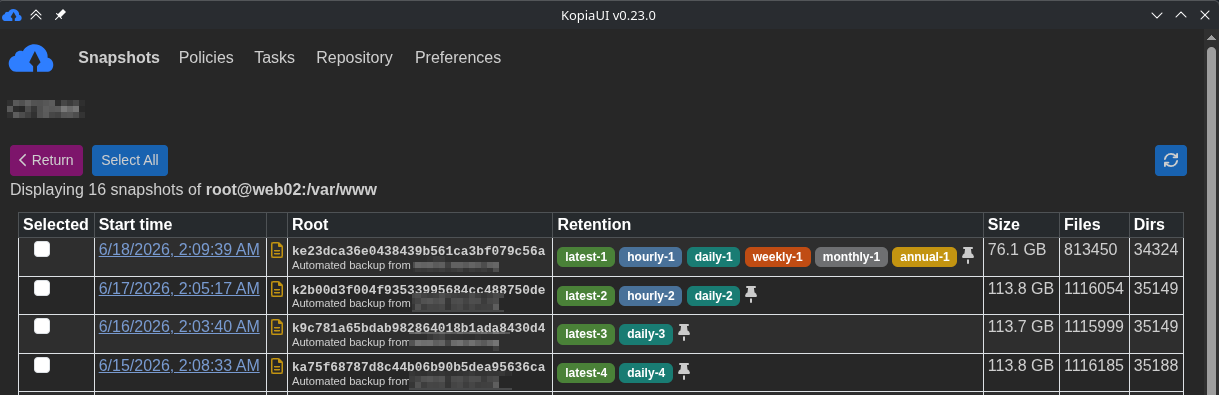
Evidence: The webserver logs showed that all requests for images were returning 404 (not found) starting at 03:08 UTC.
Evidence: Most image files returned 200 (found) up until 03:08 UTC.
Conclusion: All the WordPress file uploads were deleted at 03:08 UTC.
What happened at 3:08?
I started reading the logs for 3:08, and found something highly suspicious:
x.x.x.x - - [18/Jun/2026:03:08:11 +0000] "POST /wp-content/uploads/user_registration_uploads/temp-uploads/ll.php HTTP/2.0" 200 20 "https://www.example.com/wp-content/uploads/user_registration_uploads/temp-uploads/ll.php" "Mozilla/5.0 (Linux; Android 10; K) AppleWebKit/537.36 (KHTML, like Gecko) Chrome/149.0.0.0 Mobile Safari/537.36"
x.x.x.x - - [18/Jun/2026:03:08:13 +0000] "GET /wp-content/uploads/user_registration_uploads/temp-uploads/ll.php HTTP/2.0" 404 36 "-" "Mozilla/5.0 (Linux; Android 10; K) AppleWebKit/537.36 (KHTML, like Gecko) Chrome/149.0.0.0 Mobile Safari/537.36"
... somebody did a POST to an "ll.php" in the uploads directory, and then 2 seconds later, when they tried to GET that page, it was no longer there -- and neither were any of the site's images, generated stylesheets, or anything -- the attacker had deleted their own attack tool, along with all the uploaded files.
This was the smoking gun -- this was where the damage was done.
What else did the attacker do?
Now I had an IP address, a timeline, and a partial explanation. Time to dig deeper.
The IP address mapped back to CloudFlare -- not really helpful - but it does look like the attacker used the same address for 1734 individual requests, from 2:19 to 3:56. I found one other IP address accessing the ll.php that I also analyzed. And what I found at the start was -- a normal administrator login. This attack did not first get in due to a flaw in the site itself -- it succeeded because of a password that had presumably been revealed through some other attack. This was a general administrator attack, and it looks like they got in on the first try.
Once they were in, they changed the email address for the admin account - probably so they could do a password reset later. And they added another administrator account, which hadn't been used, but was clearly there for future attacks.
How could I tell this? Again, backups. We have a nightly database export, and after loading the backup from immediately before the attack into a stage site, I could easily see these administrator account changes.
I extracted the activity for this ip address from the logs, and used an LLM to further analyze their traffic. It does look like they tried to export as much data as they could, but otherwise a lot of what they were attempting to do failed -- either because of the way we had the server locked down, or because they deleted their own exploit a bit prematurely.
Hunting for backdoors
Deleting the malicious file and restoring the data wasn't enough on its own -- attackers who get admin access often plant a way back in. So we built a tool to scan the database itself for signs of injected backdoors: encoded PHP, suspicious function calls, unexpected executable code hiding in content fields, and about a dozen other patterns we check for after an incident like this.
That scan turned up over 5,000 hits across those dozen patterns -- which sounds alarming, but most of these patterns throw plenty of false positives on their own. To put that number in perspective: nearly 3,000 of those hits were iframes, and the overwhelming majority were harmless -- YouTube and Vimeo videos embedded in articles and podcasts over the site's many years online. Another roughly 2,000 were things like inline click handlers, mostly powering the site's job board and image galleries. Almost none of it had anything to do with the attack. That's exactly why we needed aggregation tooling on top of the raw scan -- sifting a handful of real threats out of thousands of ordinary, years-old content patterns isn't something you can do by eyeballing a list.
After working through the aggregated results, we found exactly one real backdoor: a malicious script include, repeated about a dozen times across the database. But it turned out to be completely unrelated to this attack -- a remote file inclusion vulnerability that had been sitting there since the site was migrated from its previous version, and originally created years earlier. Not something the June 18th attacker planted. Something we found and closed out as a bonus, simply because we were already in there looking.
Are we still at risk?
This is the next immediate question -- if we restore the data, what stops the attacker from just doing it again? Really it's the way we have the sites set up on the server -- the "blast radius" is quite limited. There was no evidence the attacker gained any kind of privileged access to the server -- they used a vulnerability in the "user_registration" plugin to upload a malicious file to a part of the server where users are allowed to upload files, and then they were able to successfully execute that. That could only run as the web server user account -- which doesn't have permission to change any of the actual WordPress core or plugin code -- the only thing it could damage were the other user-uploaded files, and the style files that are automatically generated by Elementor (a WordPress layout plugin, which are easily regenerated). And this code could only execute inside the Docker container that isolates PHP from the rest of the system -- the attacker was unable to reach anything outside the site itself.
This is not how most WordPress sites are set up.
Most WordPress sites allow you, as an administrator, to upload arbitrary plugins straight to the site that can then do whatever the attacker wants. Most WordPress sites have no way of knowing whether a plugin has had code changed to do malicious things.
In this case, the attack vector was a compromised administrator account, and a malicious PHP back door -- that did not manage to escape the security boundaries we had put around it.
The cleanup
Now that we had the timeline of events, and a pretty strong assessment of how the attacker gained access and what they were able to do, it was time to clean up the mess.
We blocked/deleted the administrator accounts, and restored all the files from the previous night's backup. It did take over an hour to restore 35GB of files from encrypted backup storage, but all in all this was no big deal -- mostly because we had multiple redundant systems in place to make recovery possible in the first place.
The aftermath
I like to call our systems "mistake-driven architecture" -- there are always things to learn after an incident. We do our best to learn from these mistakes, and make sure we never make the same mistake again, by improving our processes, our systems, and our habits.
So what were the mistakes this time around? Pretty clearly there were two things we could have done better:
- Regular review of administrator accounts. This admin account had not been used in years, and it was migrated from the previous system. As we offer more security-related services, going through the list of administrators with our clients, eliminating accounts with no clear user, recommending multi-factor authentication and password updates, and reviewing these accounts regularly might have prevented this attack.
- Further hardening the hosting environment. For Drupal sites, we turn off the PHP engine in all directories where a user can upload files. We had tried to do this on WordPress sites, but this was causing friction with other developers on the site, so we had relaxed this restriction, which is what allowed the attacker to run arbitrary code and delete everything. We have updated our WordPress configurations to restrict this, and make sure this kind of arbitrary code execution isn't possible.
All in all, our ability to recover was a testament to the systems we already have in place, the deep experience we already have. We wrote up an 8 page incident report with further recommendations, and helped our client identify their required information disclosure obligations -- while this was an unpleasant experience, it was far from the catastrophe it might've been without all the work we had done before the attack.
What's next?
The other part of this attack, which we still don't have a great answer for, was the premium plugin the attacker used to upload the malicious code -- the "User Registration" plugin. This premium plugin did have a security audit done, and a bunch of fixes added, to a release that came out ~10 days before the attacker used it to upload their malicious payload. However, this plugin is not available through the WordPress plugins site, and there's no way we've found to automatically update these.
The WordPress premium plugin ecosystem is a hot mess. It's an utter disaster for security. Updating free plugins and WordPress itself takes seconds. Updating a dozen premium plugins from different sites with different logins and different licenses and different policies on dev sites versus production takes hours, and cannot be easily automated.
Our WordPress protection plan does not cover premium plugins for this reason -- but they have vulnerabilities as much (or maybe more?) than the free ones that are far easier to update.
So that's the problem we're trying to solve now -- help our clients stay up-to-date, without opening up their sites to more damaging attacks.
Are you ready for the next attack?
In the end, I don't think it was a question of tempting fate, writing about how we're helping our clients be safe and secure online. No matter how much we do to keep sites up-to-date, in this age of AI, the next zero-day attack is unavoidable.
It's not about whether you'll get attacked. It's about whether you're set up to recover when you do — and to come out the other side safer than before. That's what we build for our clients. If you want to know where your own site stands, reach out.






Comments
0 comments
No comments yet.
No new comments remain in this discussion.
Add new comment